Access your patients’ radiology images directly within your practice management software. This streamlined integration makes it quick and easy to review images, saving time and helping you provide timely, efficient patient care.
If you are registered to receive electronic reports via EDI, a secure, login-free image URL will be delivered with each radiology report, allowing you to access your patient’s images directly from your practice management software.
Note: If your practice management software does not support embedded hyperlinks, simply open your patient’s radiology report, click the image URL displayed at the bottom of the report, and the associated images will automatically open in the InteleConnect EV image viewer.
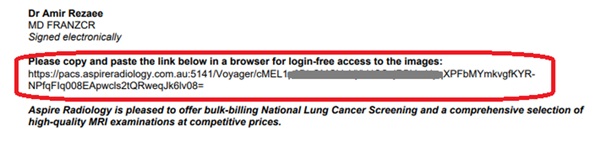
Aspire Radiology provides practitioners with rapid access to their patients’ reports and images.
We also invite you to apply for access to your patients’ results and images through the Aspire Radiology PACS system.
If you previously had an account with our legacy PACS system (Voyager), please check the inbox of the email address you registered with. We have sent important information regarding access to the new PACS system, including your login details and instructions.
You may receive email notifications when imaging results become available.
If you prefer not to receive these email alerts, you can easily turn them off by following the steps below:
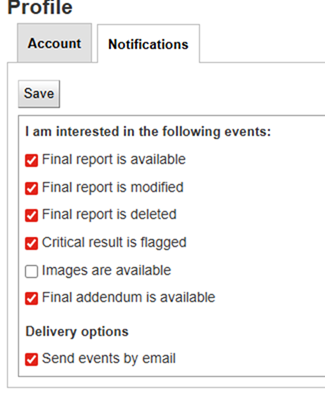
These settings can be updated at any time to suit your workflow.
To obtain immediate access to a patient record using the Break Glass function:
For the Physician Portal
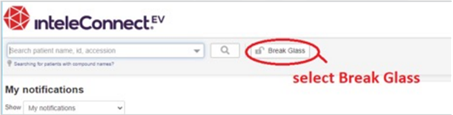
For the InteleViewer
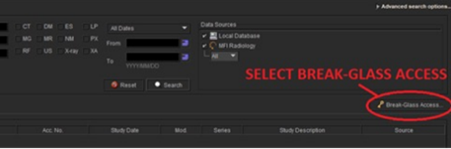
Read and accept the Confidentiality Agreement.
 (02) 9070 1172
 Request an Appointment
  Doctor Login
 Patient Portal
 Provide Feedback